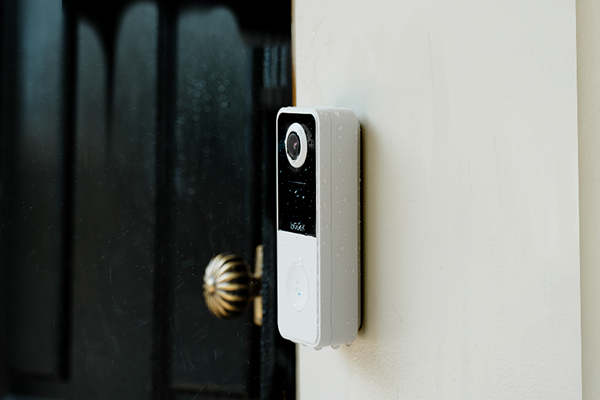


A doorbell camera is a doorbell with a built-in camera, microphone and speaker that lets you see and speak to visitors through a connected app. Depending on the model, it can also detect movement, send alerts and save video clips for you to watch later.
That can be useful when a parcel arrives while you are at work, or someone rings while you’re upstairs. Before fitting one, though, it helps to understand how the camera sends alerts to your phone, what triggers a recording and how footage is stored.

Key Takeaways
- Most smart doorbells use your home Wi-Fi to send visitor alerts and provide live video through an app.
- Live viewing and continuous recording are different features: checking the live view doesn’t mean the camera has saved everything that happened earlier.
- Local storage can reduce reliance on paid cloud plans, but clip length, retention and playback access still need checking.
- A doorbell helps you answer visitors at the front door; a separate outdoor camera can extend coverage to a driveway, garden or side access.
- Test the connection at the proposed mounting position before drilling, especially if thick brick or stone walls separate the front door from your router.
- In the UK, recording beyond your property boundary brings data protection responsibilities, including limiting coverage and handling footage appropriately.
How Does a Doorbell Camera Work?
So, how do doorbell cameras work when somebody approaches your home? The process usually follows these stages, although the details depend on your model and settings:
- The device receives a trigger. Someone presses the button, or a motion sensor detects activity. Some models use software to distinguish people from other movement.
- The camera captures the entrance. It records or streams the scene, with night vision available on supported devices.
- An alert reaches your phone. Using your home Wi-Fi and internet connection, the doorbell sends a notification to the app, so you can check who is there without going to the door.
- You can answer remotely. The microphone and speaker support two-way conversation, such as asking a courier to wait while you come downstairs.
- Footage is saved if recording is enabled. Depending on the device and service, clips go to a memory card, a compatible hub or cloud storage.
For anyone asking how a doorbell works compared with a video model, a conventional wired doorbell typically sounds a chime when pressing the button completes a circuit. A wireless doorbell sends a radio signal to its receiver. A smart video doorbell adds the camera, network connection and app controls; compatibility with an existing indoor chime needs checking separately.
Pros and Cons of Doorbell Cameras
Whether a doorbell camera earns its place depends on your daily routine and how much upkeep you are comfortable with.
Advantages of Doorbell Cameras
An unexpected ring gives you a decision to make: answer, ask what the caller needs or leave the door closed. A doorbell camera lets you see who’s there before deciding, which can be useful when you are home alone. Where shared access is supported, another household member can also respond if you are occupied, reducing the need to stop cooking, leave a work call or hurry downstairs.
Disadvantages of Cameras on Doorbells
Battery models need recharging, storage can fill or overwrite older footage, and an unreliable connection can delay alerts or interrupt live viewing. Some features require a subscription, although a doorbell without subscription can help avoid recurring fees. Motion-triggered clips may still miss part of an event. Account security also needs attention: use a unique password, enable two-factor authentication where available and install device updates.
Doorbell Camera vs Outdoor Security Camera: Key Differences
A doorbell camera is a type of security camera, but its main job is to show you what’s happening at the entrance. A separate outdoor security camera offers more freedom over where and how you monitor the property.
|
Feature |
Doorbell camera |
Separate outdoor security camera |
|---|---|---|
|
Primary Purpose |
Answering callers and checking activity at the entrance |
Monitoring areas such as driveways, gardens and side entrances |
|
Field of View |
Usually a fixed view from beside the door; vertical coverage varies |
Depends on placement and lens; some models offer pan-and-tilt control |
|
Motion Detection |
Typically focused on people approaching or standing near the entrance |
Can be positioned around wider approaches or specific access points |
|
Recording Options |
Often event-triggered clips; continuous recording depends on the model |
May offer event recording, scheduled recording or supported 24/7 modes |
|
Installation Priority |
A reachable button and a useful view of visitors |
A clear view of the area being monitored |
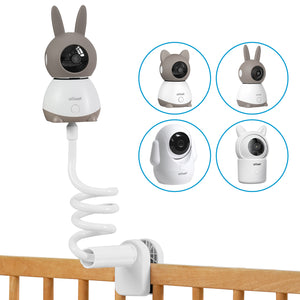
For a long driveway or a garden around the side of the house, changing the doorbell angle may still leave important areas out of sight. The ieGeek S7 wireless 24/7 recording camera offers PTZ control and an AOV 24/7 recording mode, so you can monitor a wider outdoor area and review activity beyond doorstep visits. It complements the doorbell by letting you adjust the outdoor view remotely, although walls, parked vehicles and its current viewing direction still affect what it captures.

Where Are Doorbell Cameras Most Useful?
A useful doorbell camera should help with what happens at your entrance, whether that means answering deliveries while you are out or picking out relevant alerts on a busy street.
Frequent Visitors and Deliveries
When a courier arrives while you are at work, seeing who is there is only part of the job—you may also need to discuss where to leave the parcel. The ieGeek Bell J9 Plus video doorbell combines 5MP video and a 166° wide-angle view to help you make out the caller and see more of the surrounding doorstep. Two-way audio lets you speak to the courier through your phone, so you can give delivery instructions without being at home. If the parcel is left within the camera’s view, you can also check where the courier placed it.

Busy Streets and Shared Paths
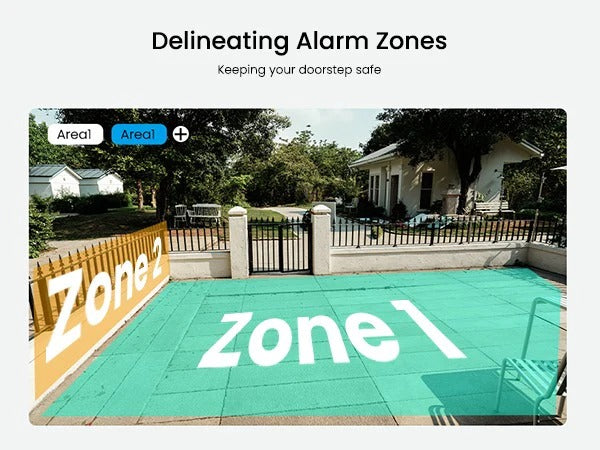
For homes beside a busy pavement, constant alerts can make a real visitor easy to miss. The ieGeek Bell J10 video doorbell combines AI human detection with customisable motion zones, helping you focus notifications on people approaching your entrance rather than every movement in the scene. Human detection filters out some non-person activity, while a zone centred on your front path helps reduce alerts from pedestrians passing further away. These zones control which activity triggers an alert; they don’t necessarily hide the pavement or neighbouring property in the footage.

Frequent Travel and Time Away
During a weekend away or a longer holiday, remote access can help you deal with an unexpected caller without explaining that the house is empty. Arrange access for a trusted household member if they may need to respond, and check that you know how to download an important clip before leaving. That way, you can save useful footage if something needs following up.
Flats and Rental Homes
For renters, a battery model may offer a simpler installation route where new wiring is impractical. Check your tenancy agreement or lease, and obtain any necessary permission from your landlord, freeholder or managing agent before fitting it. In a block of flats, a camera at your individual door also cannot answer or release the main communal entrance unless it is specifically integrated with that system.
Tips for Installing a Doorbell Camera
A doorbell can look well positioned on the wall but still miss a caller’s face or lose its connection once the door closes. As with other home security camera installation projects, a trial setup helps catch these problems before you drill.
Choose the Right Position
The best spot is usually beside the entrance, where visitors can easily see and reach the button. Porch walls, projecting brickwork or the door itself may block part of the picture, so check the preview with the door open and closed. Avoid positioning the camera behind glass, because reflections can obscure footage, particularly at night.
Adjust Height and Angle
Your model’s recommended mounting height is a useful starting point, but don’t simply reuse the old screw holes without checking the view. With someone standing at the door and a parcel on the step, you can see whether the framing captures both. A compatible angled bracket may help if the camera faces too far towards a wall.
Check Wi-Fi and Power
A connection that works beside the router may struggle at the front door, especially through thick walls. The ieGeek Bell J9 Plus and ieGeek Bell J10 use 2.4GHz Wi-Fi, so check that the band is available and the password is correct if pairing fails. Before mounting, test with the door closed; for a wired model, check the manufacturer’s voltage requirements and any existing chime’s compatibility, and use a qualified electrician for mains alterations.
Secure and Weatherproof the Device
A firm bracket and suitable fixings help keep the camera steady when the door shuts. Charging covers and cable seals need to be closed as instructed, even on a weather-resistant model. For battery devices, make sure you can remove the unit for charging without loosening the wall bracket.
Test Detection and Notifications
A short walk towards the door can reveal whether alerts arrive in time and recordings capture the approach. If the picture works but your phone stays silent, notification permissions, Do Not Disturb or app battery restrictions may be responsible. Finally, replay clips recorded in daylight and after dark to check that a caller’s face remains visible.
Check Privacy and Coverage
On UK terraced streets and shared entrances, even a small change in angle can bring a pavement or neighbouring doorway into view. Recording beyond your boundary brings data protection responsibilities, including appropriate signage, secure storage, deleting footage when no longer needed and responding to requests from people recorded. Privacy masks can reduce unnecessary coverage where supported, while audio recording should be limited to what is necessary, as microphones may capture neighbours’ conversations beyond your doorstep.
FAQ
Do doorbell cameras record all the time?
Not all models do. Many doorbell cameras record events rather than a continuous timeline, so check whether your chosen model saves button presses, motion events or both. If you need a longer activity record across a driveway or garden, the ieGeek S7 offers an AOV 24/7 recording mode as a separate outdoor camera. Check how that mode records quiet periods and movement to make sure playback suits what you need to review.
Do all doorbell cameras have a monthly fee?
No. The ieGeek Bell J10 supports local recording on a microSD card of up to 128GB, giving households a way to save footage without a monthly cloud subscription. Its UK product page also lists a free basic cloud option with six-second clips retained on a seven-day loop. If you want to review a delivery that lasts longer than six seconds, check the local recording settings and replay a test clip before relying on cloud storage alone.
Do burglars avoid homes with doorbell cameras?
A visible camera may discourage some intruders, but it cannot guarantee that a burglary or parcel theft will be prevented. Treat it as one part of home security alongside secure doors, suitable locks and sensible delivery arrangements.
How far away can doorbell cameras see?
There is no universal distance. Doorbell cameras may show movement further away than they can capture a recognisable face. Resolution, lighting, lens angle and the person’s position all affect usable detail. Check the distinction between viewing distance, motion-detection range and night-vision range.
How long do doorbell cameras last?
There is no fixed lifespan for the whole device. Outdoor exposure, battery condition and continued software support all matter. If you mean time between charges, that depends on recording activity, live viewing, temperature, and settings. A battery-life claim is not the same as an expected service life.
Conclusion
Before ordering, check three things for each model you’re considering: a sample view of the entrance, the recording features available without a subscription and the power requirements. If you're also considering advanced identification features, compare what a face recognition camera can offer and whether those capabilities are necessary for your entrance. Once the device arrives, complete a trial setup and confirm that you can receive an alert, answer a caller and replay a saved event before making the installation permanent.
About the Author
 |
Created by the ieGeek editorial team, drawing on hands-on product experience and ongoing research in Smart Security solutions. As a brand focused on simple, reliable, and affordable wireless security systems, ieGeek combines practical insights with real-world use cases to help users make informed decisions. |