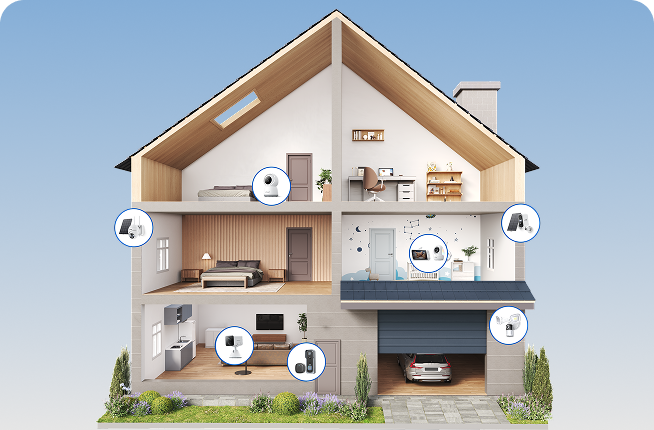




Smart technology is becoming an increasingly familiar part of everyday life. From video doorbells and smart thermostats to automated lighting and connected security cameras, homeowners now have more options than ever to make their homes safer, more convenient and more energy efficient. However, understanding what is a smart home goes beyond simply owning a few connected gadgets.
For many households, security is often the starting point. A well-planned smart home solution can help monitor deliveries, check on pets while at work, receive alerts when unexpected movement is detected and manage devices remotely through a smartphone. This guide explains how smart homes work, the technologies behind them and how UK homeowners can build a reliable, secure system that meets both current and future needs.
Key takeways
-
A smart home is not just a collection of connected gadgets. It is a home where devices communicate with each other and can be controlled, automated, or monitored through an app, hub, or voice assistant.
-
For UK households, the most useful smart home solution usually starts with one clear goal: convenience, energy control, or security. A small setup is often better than buying many devices at once.
-
Smart home security systems work best when cameras, doorbells, motion sensors, lighting, and alerts are used together. That combination creates more useful protection than a single device on its own.
-
Compatibility matters more than brand hype. Before buying, check whether devices work with your broadband, phone app, existing platforms, and whether they still offer value if the internet goes down.
-
UK buyers should also look at privacy, security updates, and subscription costs. New UK rules require stronger baseline security for consumer smart devices, which makes informed buying easier.

What Is a Smart Home?
A smart home combines connected devices, internet communication and automation to improve the way a property operates. Rather than functioning independently, devices work together to make everyday tasks simpler while offering greater control, efficiency and security. Understanding the basic principles helps homeowners make informed decisions before investing in new technology.
Smart home definition explained simply
A smart home is a property equipped with internet-connected devices that can be monitored, controlled or automated remotely. These devices may include lighting, heating, security cameras, doorbells, locks, sensors and household appliances. Most can be managed through a smartphone app, voice assistant or central smart home platform, allowing users to control their home whether they are in the living room or away on holiday. This level of integration transforms individual products into a complete smart home solution designed around daily routines and practical needs.
How does a smart home work?
| Step | What Happens |
| Detection | A sensor, camera or smart device identifies an event, such as movement or a door opening. |
| Communication | The device securely sends information through the home network or cloud service. |
| Automation | Pre-set rules trigger actions, such as switching on lights, locking doors or activating alarms. |
| Notification | The homeowner receives a real-time alert through a mobile app and can respond remotely if needed. |
For example, if motion is detected outside a property late at night, an outdoor camera can begin recording automatically while floodlights illuminate the area. The homeowner immediately receives a notification with live video, making it easier to assess the situation and decide whether any further action is required.
Reliable connectivity also plays an important role. A stable broadband connection, strong Wi-Fi coverage and secure account settings help ensure devices respond quickly and consistently. For remote locations without fixed broadband, a dedicated 4G security camera can provide flexible monitoring using a mobile data network, making it suitable for farms, construction sites, holiday cabins or other off-grid properties.
Smart Home vs Home Automation: What's the Difference?
The terms smart home and home automation are often used interchangeably, but they describe different concepts. Understanding the distinction makes it easier to choose products that match both current needs and future plans.
A smart home refers to connected devices that users can monitor or control remotely. Homeowners decide when to turn lights on, unlock doors, adjust heating or view security cameras using a smartphone or voice assistant. The emphasis is on convenience, connectivity and remote access.
Home automation, by contrast, focuses on creating automatic routines that require little or no manual input. Devices respond to triggers such as motion, temperature, time schedules or occupancy. For example, blinds may close automatically at sunset, heating adjusts when occupants leave the house or security lights activate when motion is detected overnight.
| Smart Home | Home Automation |
| Focuses on connected devices | Focuses on automatic actions |
| Remote control through apps | Trigger-based routines |
| Manual operation available | Minimal user interaction |
| Can include individual smart devices | Requires devices to work together |
| Ideal for gradual upgrades | Ideal for fully integrated living |
What Devices Make Up a Smart Home Solution?
A modern smart home solution is built around devices that work together rather than operating in isolation. While every household has different priorities, most smart homes combine security, comfort and energy management to simplify everyday living. Starting with a few carefully selected devices often delivers greater value than investing in numerous products that do not integrate well.
Smart lighting
Smart lighting is often the first step into home automation because it is affordable, easy to install and immediately useful. Unlike conventional bulbs, smart lights can be controlled through a mobile app, voice assistant or automation schedule. When integrated with a smart home security system, lights can automatically illuminate if a camera or motion sensor detects activity outside the property, helping improve visibility while discouraging unwanted visitors.
Smart thermostats
Heating accounts for a significant proportion of household energy consumption in UK homes, making smart thermostats a practical investment for improving efficiency. These devices learn heating preferences, allow remote temperature control and create schedules that better match daily routines. Some models can even adjust automatically based on occupancy or local weather conditions. Many smart thermostats also provide energy usage reports, helping households identify opportunities to reduce unnecessary consumption throughout the year.
Smart plugs
Smart plugs provide one of the simplest ways to upgrade existing household appliances without replacing them. Once connected between a wall socket and an electrical device, they allow lamps, fans, coffee machines or other appliances to be switched on or off remotely through a smartphone app. Although smart plugs are relatively simple devices, they play an important role in creating automated routines across a wider smart home ecosystem.
Smart locks
Smart locks replace or enhance traditional door locks by allowing homeowners to manage access digitally. Depending on the model, doors can be unlocked using a smartphone, keypad, fingerprint or temporary digital code rather than a physical key. This flexibility is particularly useful for families, short-term rental properties or homeowners who regularly receive deliveries or maintenance visits.
Smart doorbells
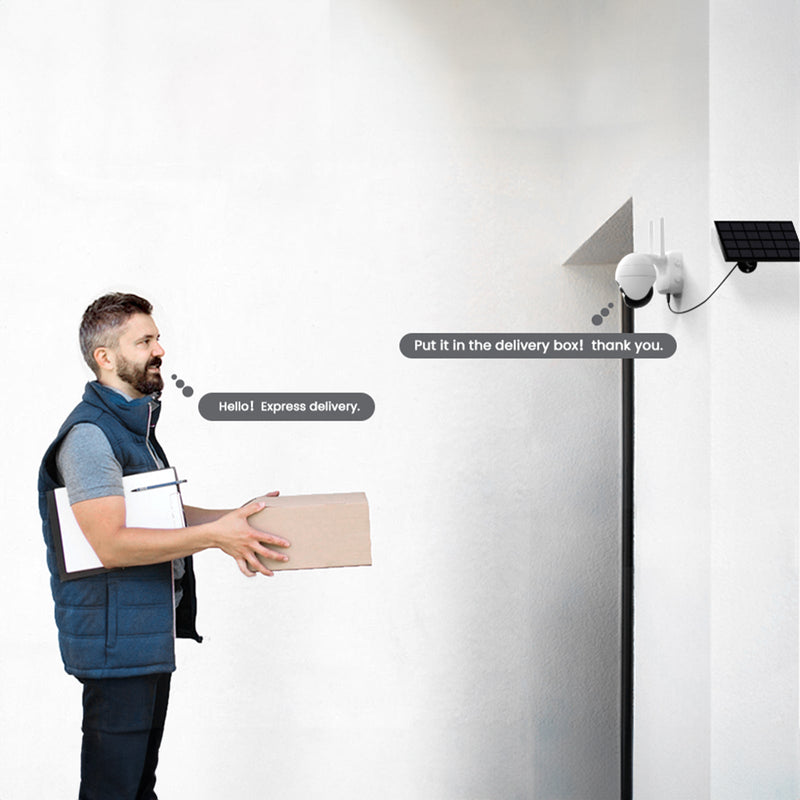
Smart doorbells have become increasingly popular across the UK because they combine convenience with improved front-door security. Equipped with cameras, microphones and motion detection, they allow homeowners to see, hear and speak with visitors whether they are at home or elsewhere.
For example, someone working in the office can receive an instant notification when a parcel arrives and communicate directly with the courier through the mobile app. This reduces missed deliveries while providing a recorded video history of activity around the entrance. A practical option for households seeking straightforward installation is the ieGeek J1 Doorbell Camera. Its wireless design makes it suitable for many existing homes without requiring extensive wiring, while remote access and motion alerts integrate naturally into a broader smart home security setup rather than functioning as a standalone device.

Smart security cameras

Smart alarms
Smart sensors
-
Motion sensors
-
Door and window contact sensors
-
Smoke and carbon monoxide detectors
-
Water leak sensors
-
Temperature and humidity sensors
Why Smart Home Security Systems Are Becoming Essential?
As connected technology becomes more accessible, security is increasingly acting as the central hub of many smart homes. Rather than relying solely on locks or standalone alarms, today's smart home security system combines cameras, sensors, lighting and remote access to provide a more complete picture of what is happening around a property. This integrated approach allows homeowners to respond more quickly to unexpected events while maintaining greater peace of mind.
24/7 property monitoring

Instant motion alerts
Remote access while away
Crime deterrence
Evidence collection
How Much Does a Smart Home Cost in the UK?
| Device | Typical UK Price |
| Smart Plug | £15–£40 |
| Smart Bulb | £15–£50 |
| Smart Thermostat | £150–£300 |
| Video Doorbell | £80–£300 |
| Indoor Security Camera | £30–£150 |
| Outdoor Security Camera | £60–£300 |
| Smart Lock | £150–£350 |
| Smart Alarm System | £200–£800 |
-
Starter setup (£200–£500): Smart lighting, a video doorbell and one indoor or outdoor camera.
-
Mid-range smart home (£600–£1,500): Multiple cameras, smart thermostat, connected lighting and several sensors.
-
Comprehensive smart home (£2,000+): Whole-home security, automated lighting, climate control, smart locks, advanced sensors and integrated routines throughout the property.
How to Build a Smart Home Step by Step
Step 1: Assess your home's connectivity
Step 2: Choose a compatible smart home ecosystem
Step 3: Start with essential security devices
Step 4: Add comfort and energy-saving devices
Step 5: Expand with automation
Step 6: Maintain and review your system
A smart home should evolve alongside changing household needs. Regularly install firmware updates, review user permissions and adjust automation rules as routines change. Periodically checking battery-powered devices, cleaning camera lenses and testing notifications helps ensure the entire system continues operating reliably over the long term.
FAQs
Is a smart home worth it?
Can I build a smart home without professional installation?
Does a smart home work without the internet?
What's the difference between Wi-Fi, Zigbee, Thread and Matter?
Can I start with one device and expand later?
Do I need a hub for a smart home?
Conclusion
A smart home is far more than a collection of connected gadgets. When carefully planned, it creates an integrated environment where lighting, heating, cameras, sensors and security devices work together to improve convenience, efficiency and peace of mind. The most successful systems are built around everyday needs, allowing homeowners to automate routine tasks while maintaining greater visibility and control over their property.
For most UK households, starting small is the most practical approach. A smart doorbell, indoor camera or outdoor security camera often delivers immediate benefits, while additional devices can be added over time as requirements evolve. Whether your priority is improving home security, reducing energy consumption or managing your property remotely, choosing compatible products from trusted manufacturers like ieGeek will provide a stronger foundation for future expansion.
Author Intro
 |
Written by the ieGeek team, a brand dedicated to making smart security simple and accessible for everyone. With experience in designing easy-to-install security cameras, we aim to provide practical advice based on real user scenarios. Our goal is to provide reliable, easy-to-use technology that helps users stay connected and protected in different environments. |