

Putting your newborn to sleep in their room brings sudden anxiety. You listen for every tiny sound. You frequently tiptoe down the hall to watch their chest rise and fall, losing your precious rest in the process. Thankfully, the best baby monitor gives you your nights back.
You are definitely not alone in wanting this peace of mind. In fact, the global infant monitor market recently climbed past GBP 1.17 billion, proving that millions of parents rely on smart tech to share the night watch. This guide breaks down what to look for in a video baby monitor. We compare key features and highlight top products. Read on to secure your baby’s safety, and finally relax.
Key Takeaways
- Choosing the right baby monitor depends on your lifestyle and home setup. WiFi baby monitors offer flexible remote access through a smartphone, while dedicated-frequency monitors provide a more stable connection without relying on internet access.
- The best baby cameras focus on practical safety features, not just video quality. Clear night vision, smart alerts, two-way audio, temperature monitoring and strong privacy protection all play an important role in everyday parenting.
- Higher resolution improves visibility, especially in low-light situations. While 1080p is enough for general monitoring, 2K and above provide more detail when checking small movements, blankets or sleeping positions.
- Correct placement is essential for reliable performance. Positioning the camera at a safe angle, avoiding direct sunlight and checking WiFi strength can significantly improve image quality and connection stability.
- Modern baby monitors can combine convenience and security. Dual systems that offer both a dedicated screen and smartphone access give parents flexibility at home and while away.
- The right monitor depends on your family’s needs. Single-camera solutions like ieGeek Baby Monitor Baby 1T suit first-time parents, while multi-camera options such as ieGeek Baby Monitor Baby 5 are better for families with twins, multiple rooms or growing children.

Understanding Baby Monitor Types: WiFi vs. Dedicated
Not all baby monitors work the same way. In fact, choosing the wrong type can cause frustration. This baby monitor review can help you pick the perfect match for your home.
WiFi baby monitors stream live video to a smartphone app over your home internet connection. This setup is perfect if you want to check on your sleeping infant while working late at the office or pulling weeds in the backyard.
However, your connection is only as strong as your internet router. A sudden WiFi drop or a dead zone in the nursery can freeze your video feed right when your baby starts to fuss.
On the other hand, dedicated-frequency monitors use a private radio channel to link the indoor camera to a handheld screen. They do not need the internet, passwords, or router setups.
Because they use Frequency Hopping Spread Spectrum (FHSS) technology, they constantly hop between radio channels. This clever trick keeps your video safe from outside hackers. The catch is distance; you cannot see your baby once you walk past your backyard.
Thankfully, many of the best baby camera options now combine the best of both worlds. These dual baby monitors with cameras give you a secure handheld screen for your nightstand and a smartphone app for when you’re out of the house.

Key Features of the Best Baby Camera
Shopping for a video baby monitor can feel overwhelming. You want to keep your child safe without having to study a thick instruction manual. Let us simplify things. Focus on a few core features, and you will find the best baby camera for your home:
-
Crisp Night Vision: Most nursery action happens in pitch black. A sharp 2K camera lets you see your baby’s tiny chest rising without switching on an overhead light.
-
Remote Camera Movement: A fixed lens misses things. Pan, tilt, and zoom (PTZ) tools let you swipe your screen to follow your toddler as they crawl into a corner.
-
Smart Safety Alerts: The best infant monitor does more than display video. It sends instant warnings to your phone if a blanket covers your baby’s face or if your baby starts crying.
-
Soothing Two-way Talk: Calm your stirring newborn with your voice through the speaker. This simple trick often saves you a freezing trip out of bed at 3 a.m.
-
Room Temperature Tracking: A room temperature of 16–20⁰C is ideal for your baby's growth in the UK. Built-in sensors alert you if the nursery gets too hot or cold.
-
Strong Privacy Locks: Your family’s privacy is non-negotiable. Always look for secure FHSS radio signals or password-protected WiFi connections.
The right tools make parenting much easier. When you choose a system with these smart features, you build a reliable safety net around the crib. This allows you to sit down and relax on the couch, knowing your little one sleeps safely upstairs.
Resolution Comparison: 1080p vs. 2K
Resolutions are always listed at the top of product descriptions. However, what does the jump from 1080p to 2K mean when you are staring at a dark screen in the middle of the night? Let us break down these technical terms.
Think of screen resolution as a grid of tiny paint dots, or pixels, making up your video picture. The more dots your camera packs into the frame, the clearer your view becomes.
-
1080p Full HD: This is the baseline standard for any modern baby video monitor. It gives you a clear picture of the room as a whole. You can easily tell if your baby is awake or asleep.
-
2K Ultra HD: This option packs roughly 77% more detail into the screen than a 1080p lens. That extra sharpness really shines when you zoom in digitally. For example, you can easily see if your newborn has kicked off their blanket without blurring the image.
-
2.5K UHD: This premium option offers the highest clarity available. It cleans up the fuzzy grain of infrared night vision, making it perfect for watching tiny movements from across a large room.
| Resolution | Pixel Count | Best Real-Life Use Case |
| 1080p Full HD | 1,920 × 1,080 | Checking on toddlers who move around a lot |
| 2K Ultra HD | 2,560 × 1,440 | Watching a newborn's chest rise and fall |
| 2.5K UHD | 2,560 × 1,600 | Monitoring twins on a split-screen layout |
Choosing a higher resolution gives you a clearer window into your child’s nursery. For younger infants, investing in a 2K or higher lens is helpful. The sharp image lets you check on your sleeping baby from your own bed.

Practical Suggestions for Placing Your Baby Monitor
Even the best baby monitor performs poorly if you set it up in the wrong spot. Follow these simple placement tips to get the clearest view of your sleeping child:
-
Mount It High: Place the camera about 3-5 feet above the mattress. Point it down at a 45-degree angle. This setup gives you a full view of the crib without stretching the image.
-
Keep a Safe Distance: Always secure the camera at least 3 feet away from the crib. You might read confusing things online about EMF radiation, which are invisible waves emitted by electronics. However, health experts, including the FCC, confirm that these monitors are completely safe. The signal strength drops to almost zero just a few feet away.
-
Avoid Bright Windows: Never point the camera lens directly at a window that faces the sun. Bright sunlight temporarily blinds the lens, rendering your motion alerts useless.
-
Test Your WiFi First: Take your smartphone into the nursery and check the WiFi signal strength. If the signal looks weak, you will need to boost your home router or choose a dedicated radio monitor instead.
-
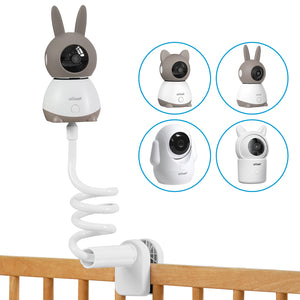
Use a Sturdy Wall Mount: A camera sitting loosely on a dusty shelf can easily tumble when a toddler starts exploring. A fixed wall bracket maintains the perfect viewing angle and safely hides the power cords.
Once your nursery is secure, you can relax downstairs. Many parents love checking the camera while cooking dinner or watching a movie.
Top Recommended ieGeek Baby Monitors
Finding the right setup brings instant relief to tired parents. Whether you have one sleeping newborn or two active toddlers, picking a system that fits your daily routine matters. Here are two highly rated options designed for parenting:
ieGeek Baby Monitor Baby 1T
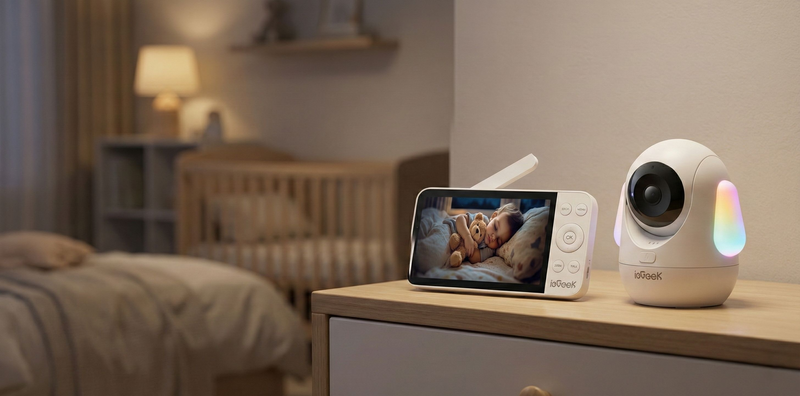
The ieGeek Baby Monitor Baby 1T is a fantastic starting point for first-time parents. It offers a simple, highly reliable baby monitor with a camera setup that requires zero technical skills. You plug it in and watch.
You can cook dinner downstairs while your newborn naps upstairs. A glance at the dedicated screen shows you their exact position without draining your smartphone battery.
-
Crisp 2K Vision: Watch tiny chest movements clearly, even in a pitch-black room.
-
Smart Sound Alerts: The system distinguishes between a baby crying and a truck driving by, sending you alerts only when it matters.
-
Climate Tracking: Built-in sensors warn you instantly if the nursery gets too chilly overnight.
-
Remote Room Scanning: Swipe the 5-inch screen to silently pan the camera around the room.

ieGeek Baby Monitor Baby 5
If you have twins or an older toddler sleeping down the hall from a newborn, managing two rooms gets tricky. The ieGeek Double Baby Monitor Baby 5 steps up with a larger display and advanced safety features, making it perfect for busy, growing families.
Picture this: you wake up at 2 a.m. and instantly see both children on a single split screen. You never have to fumble with buttons or switch camera views in the dark.
-
Dual 2.5K Cameras: View two ultra-sharp video feeds simultaneously on a large 5.5-inch split screen.
-
Advanced Sleeping Alerts: Smart AI spots if a loose blanket covers your baby’s face or if they roll onto their tummy.
-
Flexible Connections: It pairs a private, lag-free radio signal for your nightstand with a secure WiFi app for checking in from work.
-
Auto-tracking: The lens automatically follows your busy toddler as they crawl across the playroom floor.
The right choice depends on your family size. Picking a dependable tool takes the constant guesswork out of bedtime, letting you close your eyes and relax.

FAQs
Q: Can I use multiple cameras with one monitor?
Yes, you can connect multiple exterior house cameras. For example, the ieGeek Baby Monitor Baby 5 offers a handy split-screen view. This lets you watch your sleeping newborn and a playing toddler at the same time. Studies show dual-camera setups save parents countless trips between rooms. Pair them through the free menu, with no hidden fees.
Q: Is the WiFi connection secure on the Baby 1T?
Yes, your live video feed stays safe. The ieGeek Baby Monitor Baby 1T uses private FHSS radio signals that constantly scramble channels to block outside hackers. Furthermore, cybersecurity experts recommend using modern WPA3 router passwords. When you secure your home internet properly, you build an invisible, hacker-proof wall around your sleeping baby’s stream.
Q: Does the monitor alert me if the room gets too hot?
Yes, built-in sensors track the nursery climate perfectly. You will receive an instant warning if the space becomes dangerously warm or freezing cold. The NHS clearly states that room temperatures must be between 16°C and 20°C for safe sleep. Consequently, this smart feature lets you adjust the thermostat early without waking your child who is resting.
Q: How long does the battery last on the handheld unit?
A fully charged screen lasts through the night. You get up to 8 hours of live video or an impressive 24 hours in audio-only mode. For long overnight stretches, leave it plugged in. This handy battery flexibility lets you carry the screen into the garden for sunny afternoon naps.
Q: What is the difference between FHSS and standard WiFi for baby monitors?
FHSS works like a private, invisible radio wire, connecting your camera to your bedside screen without an internet connection. Conversely, standard WiFi streams video over your broadband router, letting you check the nursery from work. According to tech data, dual-mode systems offer constant reliability by combining local privacy with the flexibility of remote smartphones.
Q: Do I need a subscription to use the ieGeek app?
No, you never have to pay monthly fees. You get full live streaming, smart AI alerts, and free family sharing right out of the box. Instead of buying pricey cloud plans, you can pop in a simple 128GB micro SD card. This local storage holds weeks of free funny baby footage.
Conclusion
The best baby monitor fits your life, giving you real-time alerts so you can finally rest with confidence. Whether you prefer a flexible WiFi app or a private dedicated screen, match the core features to your daily routine.
The ieGeek Baby Monitor Baby 1T and Baby 5 both offer crisp video, smart AI alerts, and a very easy setup. If you need a reliable baby camera without overspending, both models deliver what tired parents need today, even in the most dangerous places in London.
Author Intro
 |
Created by the ieGeek editorial team, drawing on hands-on product experience and ongoing research in Smart Security solutions. As a brand focused on simple, reliable, and affordable wireless security systems, ieGeek combines practical insights with real-world use cases to help users make informed decisions. |